Skip to product information
1 of 7

VssoPlorWirelesskeyboardMouse

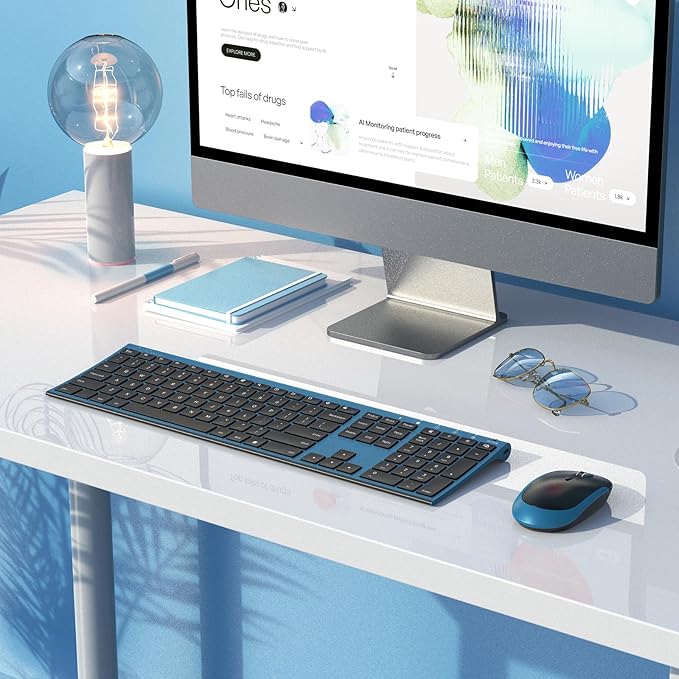
Wireless Keyboard and Mouse, Vssoplor 2.4GHz Rechargeable Quiet Full-Size Keyboard and Mouse Combo with Nano USB Receiver for Windows, Laptop, PC, Notebook-Black and Blue

Wireless Keyboard and Mouse, Vssoplor 2.4GHz Rechargeable Quiet Full-Size Keyboard and Mouse Combo with Nano USB Receiver for Windows, Laptop, PC, Notebook-Black and Blue

Regular price $60.75 USD
Regular price Sale price $60.75 USD
Sale Sold out
Shipping calculated at checkout.
Quantity

About This

  • ♥Stable Connection: 2.4 GHz wireless provides a powerful, reliable connecton up to 10m without any delays. 2 in 1 Nano receiver unifies the keyboard and mouse connections into one USB port, plug and play quickly. NOTE: The switch is on the top right corner of the keyboard
  • ♥Adjustable DPI & Ergonomic Design: 3 DPI levels (1000/1600/2400 DPI) allows you to change the cursor sensitivity easily and track more smoothly over a variety of surfaces. Contoured shape fits your hands perfectly, reducing hand fatigue
  • ♥Rechargeable & Auto Sleep Mode: This keyboard and mouse combo can be easily charged with included charging cable. Built-in rechargeable battery supports using for over one month with a single fully charge. It can automatically enter into sleep mode in order to save energy and press any key to wake it up
  • ♥Full Size & Ultra Slim: Ultra slim (5.5mm) keyboard looks more stylish and elegant. High-End Scissor Switch design provides a better tactile response and comfortable and whisper quiet typing experience
  • ♥Hot Keys & Compatibility: The full size keyboard includes fast-access hot keys, versatile function keys and number pad which can improve you work efficiency. Compatible with Computer, Laptop, Desktop, PC, Notebook, Windows XP / Vista / 7 / 8 / 10 or later
  • ♥How to re-pair the keyboard and receiver? Turn on the keyboard switch, hold ESC+Q to enter Pairng Mode. You will see the indicator light flashing. Insert the usb receiver to your computer, place keyboard as close as you can and wait for a bit or until the light stop flashing. And there we paired the keyboard. Pair the mouse: Hold down the mid wheel and right click button and turn on the mouse switch simultaneously, wait for 2 seconds to enter pairing mode. Place mouse as close as you can to pair. Now release the button. Note: If this doesn't work, please turn off all wireless device around you and try the entire process again. Remember to pair the keyboard first, then the mouse.
  • ♥Please Note: The USB receiver is located on the back of the mouse to prevent loss

Overview

  • Brand : VssoPlor
  • Color : Black and Blue
  • Connectivity Technology : 2.4G Wireless
  • Special Feature : Ergonomic, Full Size, Quiet, Rechargeable, Slim
  • Compatible Devices : Laptop, Personal Computer
View full details

What Our Customers Say

Trusted by professionals worldwide

S

Sarah Johnson

Office Manager, TechCorp

Verified Customer

UNLTRA has transformed our office supply ordering. Fast delivery and excellent quality products every time!

M

Michael Chen

Procurement Lead, StartupHub

Verified Customer

Best prices on office tech supplies. Their customer service team is incredibly responsive and helpful.

E

Emily Rodriguez

Operations Director, Creative Agency

Verified Customer

We've been ordering from UNLTRA for 2 years. Consistent quality and reliability you can count on.

D

David Park

IT Administrator, Finance Group

Verified Customer

Great selection of tech supplies at competitive prices. The ordering process is smooth and efficient.

We believe your workspace shapes your life.


UNLTRA provides carefully selected workspace essentials that improve comfort, organization, and productivity. Our mission is simple: help you work smarter, stay focused, and perform at your best every day.